The best at-home golf practice equipment is the smallest setup that lets you repeat one useful task. Start with putting if you cannot establish a suitable hitting area. Add a net and hitting surface only after checking the installation, then consider a launch monitor if you have room for its specific arrangement. This guide compares buying routes rather than claiming a tested overall winner.
Compare the practice job first
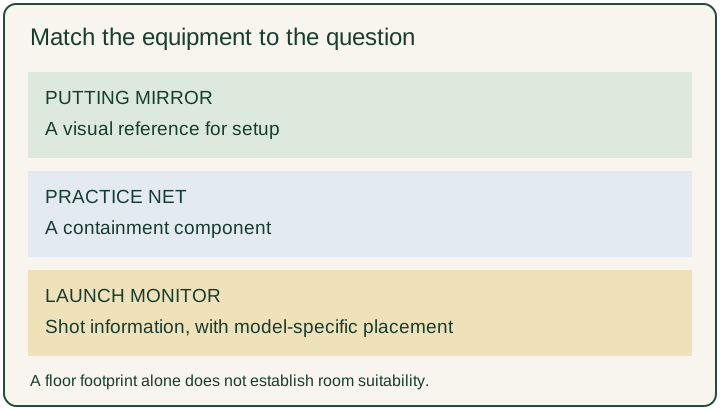
A putting mirror, a catching net and a launch monitor answer different questions. A mirror gives you a visual reference for setup; a net contains shots within its intended installation; a monitor adds shot information. Buying the most elaborate package does not settle which question you actually need to answer.
Use the interactive comparison above to narrow the route by task and room readiness. An unconfirmed hitting area produces a hold, even if you select a launch monitor. The result is a shopping shortlist, not permission to swing indoors. No room dimensions entered here can establish that a room is safe.
| Route | Example to investigate | What to check before buying | Reason to defer |
|---|---|---|---|
| Putting setup feedback | PuttOUT Tour Putting Mirror | Existing rolling surface and the view you want to check | You mainly want full-shot feedback |
| Ball containment | The Net Return Home net | Complete installation instructions and space around the installed net | Ceiling, surroundings or containment remain uncertain |
| Shot information | Garmin Approach R10 | Manufacturer placement, compatible setup and current feature requirements | You cannot accommodate the specified arrangement |
These are examples of different equipment roles, not a ranking based on comparative testing. We have not measured their accuracy, durability, noise or effect on scores. The sources describe manufacturer requirements and features; they do not establish that one product works best for every golfer.
A putting aid for a small, repeatable task
For a household where full swings are unsuitable, start by deciding what you want to observe during putting. A visual setup reference is a different purchase from a long rolling surface or a target. Lay out your existing putter, ball and available surface before adding another item.
PuttOUT describes its Tour Putting Mirror as a setup reference with alignment markings. Its listed size is 295 mm front to back and 154 mm wide. That is the mirror footprint, not a recommended practice-area size. You still need room for your stance, putter movement and the ball's intended route. We have not tested whether using it changes a player's putting.
A practical first session is to select one observation and write it down in plain words. For example, record whether you could see the intended reference consistently. Avoid turning an equipment choice into several simultaneous swing changes. If your question needs coaching rather than a visual reference, equipment alone may leave it unresolved.
A net belongs in an installation plan
A net purchase is more than a rectangle on a floor plan. Check the complete instructions for the chosen model, the surrounding area, setup and inspection, and what is included in the package. Do not assume a product photograph shows all the clearance that an actual installation needs.
The Net Return Home product page identifies a home practice net. Treat that as a containment component to investigate alongside the hitting surface and installation requirements. This guide does not certify a room or endorse striking real balls in an unverified space.
Write a separate line for each unresolved part of the setup: overhead clearance, club movement, the area behind the net, exposed hard surfaces and access by other people. An unknown stays unknown. Do not replace it with a guess simply because the net itself appears to fit.
Our golf practice mat guide separates surface choice from a basic footprint comparison. Read it when the missing decision is the surface rather than the type of equipment. A mat that fits on the floor does not establish room suitability or ball containment.
A launch monitor needs its own space check
Garmin's Approach R10 shot-preparation instructions place the device 6–8 feet behind the ball and require at least 8 feet from the tee location to an indoor net. Those two segments alone total 14–16 feet along the target line. They exclude space behind the net and other installation clearances.
The same instructions call for unobstructed club movement, suitable containment and padding on a net or enclosure frame to reduce ricochet. These requirements are specific to that device and setup; do not transfer the distances to every launch monitor. Check the current manual before purchase.
If you cannot fit the specified arrangement, remove this model from the indoor shortlist. Rotating a floor sketch or counting the room diagonal does not answer whether the complete installation works. A monitor also leaves the separate questions of hitting surface, containment, software features and ongoing cost to resolve.
Compare the complete basket
Build a quote using the actual items required for your chosen route. Keep delivered equipment cost, optional accessories and recurring charges on separate lines. Check the exact model, included parts, returns and current terms directly with the seller. This article supplies no live price promise.
For putting, the basket may be a single feedback aid if you already have a suitable surface. For a hitting setup, write down the surface and containment components independently. For a monitor, verify current compatibility and which functions require an additional service before deciding that the base unit is the whole purchase.
Do not compare a standalone accessory against a complete bundle as though their prices represent the same task. Equally, do not buy an entire bundle merely to obtain one part. List what you already own and the specific missing job beside each proposed item. Leave out purchases whose role you cannot explain.
Make one choice you can revisit
Choose one route, one observation and a short session you can repeat. Store the equipment afterward and note how much setup effort it required. This is an original planning method, not a tested training protocol or a promise to lower scores. You can decide to keep your existing equipment if the new purchase adds no clear function.
Before the next purchase, ask whether the first item answered its intended question. If the answer remains unclear, keep the note rather than escalating automatically to more expensive hardware. For a session away from home, our short-game practice guide provides a related planning route.
Source and review boundaries
Manufacturer pages were reviewed on 21 October 2026. Product descriptions support the stated roles and the specific dimensions or placement requirements above. We have not performed a comparative equipment test, verified every retailer's stock or assessed your room. The matrix helps organize a purchase decision; installation decisions require the current instructions for the exact equipment.